
An SMS API is the interface that lets software send and receive text messages automatically, without anyone typing them by hand. It connects an application, whether a website, a CRM, an e-commerce platform, or a custom backend, to a messaging provider's network, so a line of code can trigger a passcode, an order confirmation, or an alert the instant an event happens. When a bank texts a login code the moment you sign in, or a store confirms an order the second you check out, an SMS API made that happen.
For a developer, an SMS API turns messaging into a few well-defined requests. For a business, it turns messaging into an automated part of the product rather than a manual task someone remembers to do. The value is not just automation but timing and scale: messages fire at exactly the right moment, to one recipient or a million, with no human in the loop. Understanding how the API works, what it can do, and how to integrate and choose one is the difference between messaging that runs reliably in the background and messaging that breaks under load or fails silently.
What an SMS API does
An SMS API exposes a messaging provider's sending and receiving capability as a set of programmable functions. Instead of logging into a dashboard to send a text, an application makes a request to the API, and the message goes out. The same interface receives inbound messages and reports back what was delivered.
In practice, an SMS API handles four core jobs: sending an outbound message from application to phone, receiving inbound messages from a customer back to the application, reporting delivery status so the sender knows what arrived, and often supporting related functions such as number validation and scheduling. Everything a business builds on SMS, from two-factor authentication to appointment reminders to marketing automation, is assembled from these building blocks.
How an SMS API works
The mechanics are simpler than they look, and knowing them explains both what an SMS API can do and where it can fail.
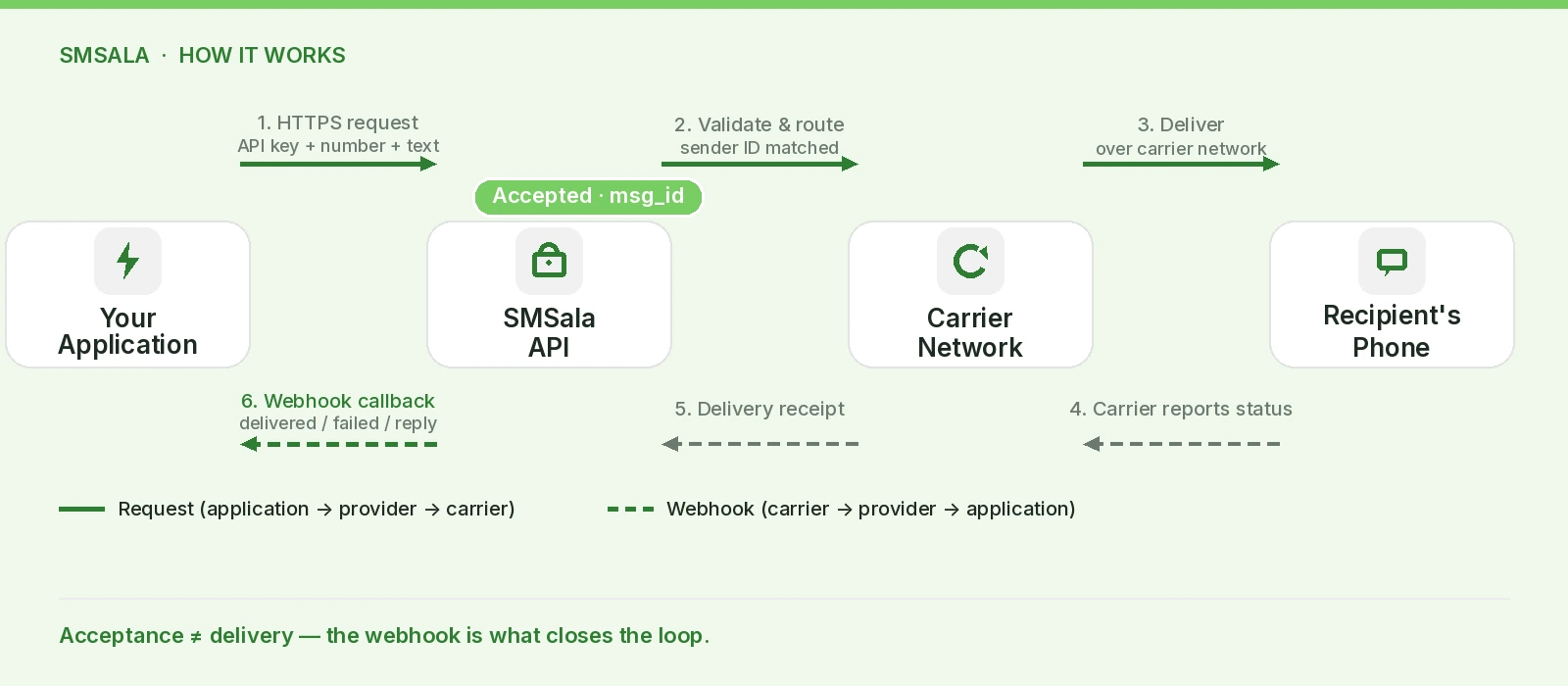
Sending a message starts with an authenticated request. The application sends an HTTP request to the provider's endpoint, including an API key or token that proves who is sending, plus the destination number, the sender ID, and the message text. The provider validates the request, formats and routes the message across to the recipient's carrier, and returns an immediate response confirming the message was accepted and giving it a unique identifier. That acceptance is not the same as delivery, which is a crucial distinction.
Authentication is what keeps an API secure. Access is controlled by API keys or tokens, secret credentials the application includes with every request. Anyone holding a key can send messages and run up a bill, which is why protecting keys is a core security responsibility rather than an afterthought.
Delivery receipts close the loop. After a carrier attempts delivery, it returns a status, which the provider passes back to the application through a webhook, an automated callback to a URL the application exposes. This is how an application learns that a message was delivered, failed, or is still pending, and it is why accurate delivery reports depend on both the API and the quality of the route behind it.
Inbound messages work the same way in reverse. When a customer replies or texts a business number, the provider receives it and forwards it to the application through a webhook, letting the software react in real time. This is the foundation of two-way messaging and anything conversational built on SMS.
The pattern to remember is request-and-webhook: the application pushes messages out with requests and receives status and replies back through webhooks. Get both directions right and the integration is robust; handle only sending and ignore webhooks, and the application is blind to what actually happened.
HTTP API versus SMPP: the real connection choice
There is a persistent confusion worth clearing up. Providers sometimes advertise an "HTTP API" and a "REST API" as if they were different things, but a REST API is simply a well-structured API that runs over HTTP. Both are HTTP-based, developer-friendly, and suitable for the vast majority of integrations.
The connection choice that actually matters is between an HTTP-based API and SMPP. An HTTP API, including modern REST designs, is easy to integrate, works from any language, and suits almost all business needs. A bulk SMS REST API is the natural default for new projects. For extremely high, sustained throughput, an SMPP connection provides a persistent binary link of the kind carriers themselves use, at the cost of more complex integration. Most businesses never need SMPP; those sending tens of thousands of messages a second do.
Connection | Best for | Trade-off |
HTTP / REST API | Most business and developer needs | Simple, flexible, quick to build; ample for high volume |
SMPP | Very high, sustained throughput | Maximum performance; more complex to integrate and maintain |
What you can build with an SMS API
The API is a building block, and the range of what businesses assemble from it is wide. The common patterns fall into a few groups.
Authentication and verification. Sending one-time passcodes for login and two-factor authentication is among the highest-volume uses, where reliable, low-latency OTP delivery directly affects whether users can access an account.
Transactional notifications. Order confirmations, shipping updates, payment receipts, and appointment reminders, all triggered automatically by an event in another system.
Alerts. Fraud warnings, security notices, outage alerts, and other time-critical messages where speed is the whole point.
Two-way and conversational flows. Reply-based confirmations, surveys, and support, often powered by a chatbot that handles routine replies and escalates when needed.
Marketing automation. Triggered campaigns such as cart recovery and re-engagement, fired by behavior rather than sent by hand.
Because the API is programmable, these are not fixed products but patterns a business composes to fit its own workflow, which is exactly why an API is more powerful than a dashboard for anything that needs to run automatically at scale. Many providers now expose the same interface for richer channels, so the same integration can reach WhatsApp Business and RCS alongside SMS.
Features to expect from a capable SMS API
Beyond basic send and receive, a mature SMS API offers a set of features that separate a production-grade service from a toy.
Two-way messaging through inbound webhooks. Real-time delivery receipts tied to carrier responses. A number-validation or HLR lookup function to check whether a number is live before sending. Scheduling so messages can be queued for a future time. Support for the right Sender ID per country. Proper handling of message encoding and segmentation, including the switch to Unicode for non-Latin scripts. And often multichannel reach, so one integration serves several messaging channels. A provider missing several of these forces the business to build them itself or go without.
Integrating an SMS API
Getting from zero to sending is a predictable sequence, and doing the steps in order prevents most integration problems.
Get credentials. Sign up with a provider and generate API keys. Store them securely, never in client-side code or a public repository.
Make a test send. Call the send endpoint with a single message to confirm the request format, authentication, and a real delivery to a test number.
Handle the response. Read the API's response, capture the message identifier, and record it, since you will need it to match delivery receipts later.
Set up webhooks. Expose endpoints for delivery receipts and inbound messages, and register their URLs with the provider so the application learns what happened and can react to replies.
Add encoding and segmentation logic. Handle long messages and non-Latin characters correctly so cost and rendering behave as expected.
Build in error handling and retries. Plan for failed requests, rate limits, and undelivered messages rather than assuming every send succeeds.
Test under load, then go live. Confirm behavior at realistic volume before switching real traffic on.
The step teams most often skip is webhooks. An integration that only sends is only half built, because it never learns whether messages arrived or when customers reply.
How to choose an SMS API
The API surface can look similar across providers, so the decision usually comes down to what sits behind it. Weigh these criteria.
Criterion | Why it matters |
Route quality | Direct carrier routes, not grey routes, decide whether messages actually arrive |
Coverage | Genuine reach and local routes in the countries you send to |
Deliverability and reporting | Honest delivery rate data tied to carrier receipts |
Documentation and SDKs | Clear docs and libraries shorten integration from days to hours |
Reliability | Published uptime and stable throughput for automated flows |
Compliance support | Help with registration and rules in your markets |
Pricing | Transparent per-country rates, priced against your real traffic mix |
Support | Reachable, technical help when an integration or route breaks |
A practical test cuts through the marketing: read the provider's actual API documentation before signing up. Good docs signal a service built for developers; thin or outdated docs predict a painful integration. And ask how the provider routes to your top destination countries, because deliverability, not the API design, is what most often separates providers. Since business SMS is A2P messaging that carriers filter and regulate, the API is also where compliance is either supported or left to you.
Security and best practices
Because an SMS API can send messages and spend money on request, its security deserves real attention.
Protect API keys as secrets. Keep them out of client-side code, public repositories, and shared documents, rotate them periodically, and use separate keys for test and production so one leak does not compromise everything. Verify incoming webhooks so a malicious actor cannot forge delivery receipts or fake inbound messages to your endpoints. Respect and handle rate limits, both the provider's and your own, so a bug or a burst does not flood the API. And defend the endpoints that trigger messages against abuse, because forms that fire an SMS, especially OTP forms, are a target for artificially inflated traffic fraud, where bots trigger floods of messages to run up a bill. Rate limiting, monitoring for abnormal spikes, and CAPTCHA on message-triggering forms are the core defenses, backed by a provider whose spam filters and monitoring can flag the pattern.
Treated with this care, an SMS API is a secure and dependable piece of infrastructure. Treated carelessly, it is an open door to cost and abuse.
Frequently asked questions
What is an SMS API in simple terms?
It is a programmable interface that lets an application send and receive text messages automatically. Instead of typing messages in a dashboard, software makes a request to the API and the message is sent, and the API reports back what was delivered.
How does an SMS API work?
An application sends an authenticated request to the provider's endpoint with the recipient, sender, and message. The provider routes it to the carrier and returns an acceptance response, then reports delivery status and any inbound replies through webhooks, which are automated callbacks to the application.
What is the difference between an HTTP API and an SMPP connection?
An HTTP or REST API is simple, works from any language, and suits almost all needs. SMPP is a persistent binary connection for very high, sustained throughput, offering more performance at the cost of more complex integration. Most businesses only need an HTTP-based API.
Do I need a developer to use an SMS API?
Integrating an API directly requires some development, though good documentation and SDKs make it straightforward. Businesses without developers often use pre-built integrations or a dashboard for the same provider, reserving the API for automated, system-triggered messaging.
How do I secure an SMS API?
Protect API keys as secrets, rotate them, separate test and production keys, verify incoming webhooks, respect rate limits, and defend message-triggering forms against inflated-traffic fraud with rate limiting, monitoring, and CAPTCHA.
What should I look for when choosing an SMS API?
Route quality and deliverability first, then coverage in your markets, clear documentation and SDKs, reliability, compliance support, transparent pricing, and responsive support. The API design matters less than the network and routes behind it.
Conclusion
An SMS API is the layer that turns messaging into an automated, programmable part of a business, firing the right message at the right moment at any scale. Building on one well means handling both directions of the flow, sending with authenticated requests and listening through webhooks, securing keys and endpoints, and choosing a provider on route quality and documentation rather than on surface features.
For teams that want an SMS API backed by direct routes, honest delivery reporting, clear documentation, and the compliance support their markets require, that foundation sits behind a reliable SMS gateway and is where an experienced messaging partner earns its place, so every message an application sends arrives and is accounted for.